



Delete the Recycle Bin Icon from the Desktop in XP/2003
How can I delete the Recycle Bin icon from the desktop in Windows XP/2003?
To delete the Recycle Bin icon from the Windows XP/2003 desktop follow these steps:
- Open Registry Editor.
- In Registry Editor, navigate to the following registry key:
HKEY_LOCAL_MACHINE\SOFTWARE\Microsoft\Windows\CurrentVersion\Explorer\Desktop\NameSpace
- Find the following key:
{645FF040-5081-101B-9F08-00AA002F954E}
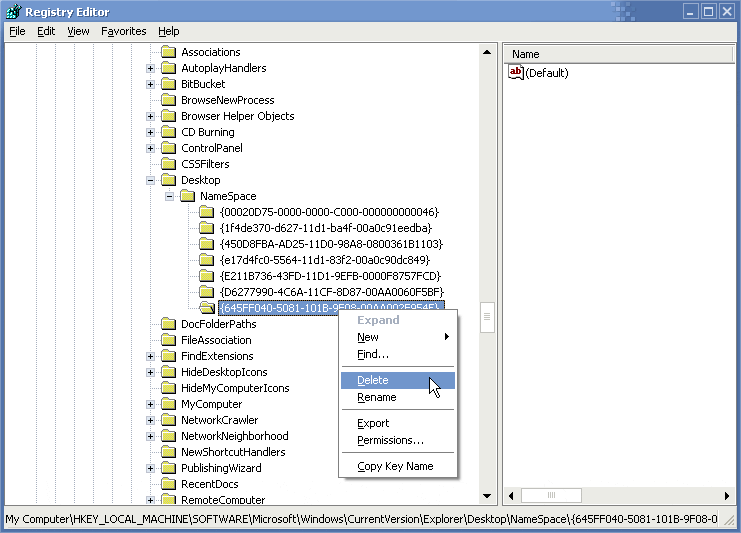
- Delete the above key.
Note: As always, before making changes to your registry you should always make sure you have a valid backup. In cases where youre supposed to delete or modify keys or values from the registry it is possible to first export that key or value(s) to a .REG file before performing the changes.
- Close Registry Editor.
There is no need to reboot. Just wait a few seconds and see how the icon disappears from the desktop.
- In order to restore the Recycle Bin icon to the desktop just re-create the missing key (or import it back to the registry in case youve exported it earlier).
In Registry Editor, navigate to the following registry key:
HKEY_LOCAL_MACHINE\SOFTWARE\Microsoft\Windows\CurrentVersion\Explorer\Desktop\NameSpace
- Create the following key:
{645FF040-5081-101B-9F08-00AA002F954E}
(just copy/paste, including the brackets).
Done!
Related articles
You might also want to read the following related articles:
- Add Administrative Tools Icon to the Desktop in XP/2003
- Add Command Prompt Here Shortcut to Windows Explorer
- Add Printers and Fax Icon to the Desktop in XP/2003
- Add Scanners and Cameras Icon to the Desktop in XP Pro
- Add Scheduled Tasks Icon to the Desktop in XP/2003
- Add Spell Checking to Internet Explorer
- Change or Add OEM Logo and Information
- Customize a New XP Installation
- Customize Command Prompt in Windows XP/2000/2003
- Customize the Places Bar in Office XP
- Disable Shared Documents Folder in Windows XP
- Microsoft Powertoys Suit
- Quickly Search Active Directory from the Desktop
- Quickly Share Folders from Desktop
- Restore Classic Search in Windows XP
- Send To Notepad Shortcut
- Shell Enhancements and other Tweaks for Windows XP/2000/2003
- Unhide Recycle Bin when Dragging and Dropping Files
