



What if instead of administering a fleet of remote Windows computers via separate remote desktop windows you could have a compact tabbed interface to manage them all in? What if instead of managing your remote desktop connections via a folder full of .rdp files you could arrange them in a neat hierarchy within one simple interface? With MuRD (Multiple Remote Desktop) from T and K software, those things and more are available to you.
MuRD is a $34.95 USD remote desktop connection manager that uses the mstscax.dll ActiveX control to establish remote desktop connections. MuRD allows you to store all of your remote desktop connections within its Connection Manager interface and easily keep track of multiple open sessions within tabs or the standard full screen view.
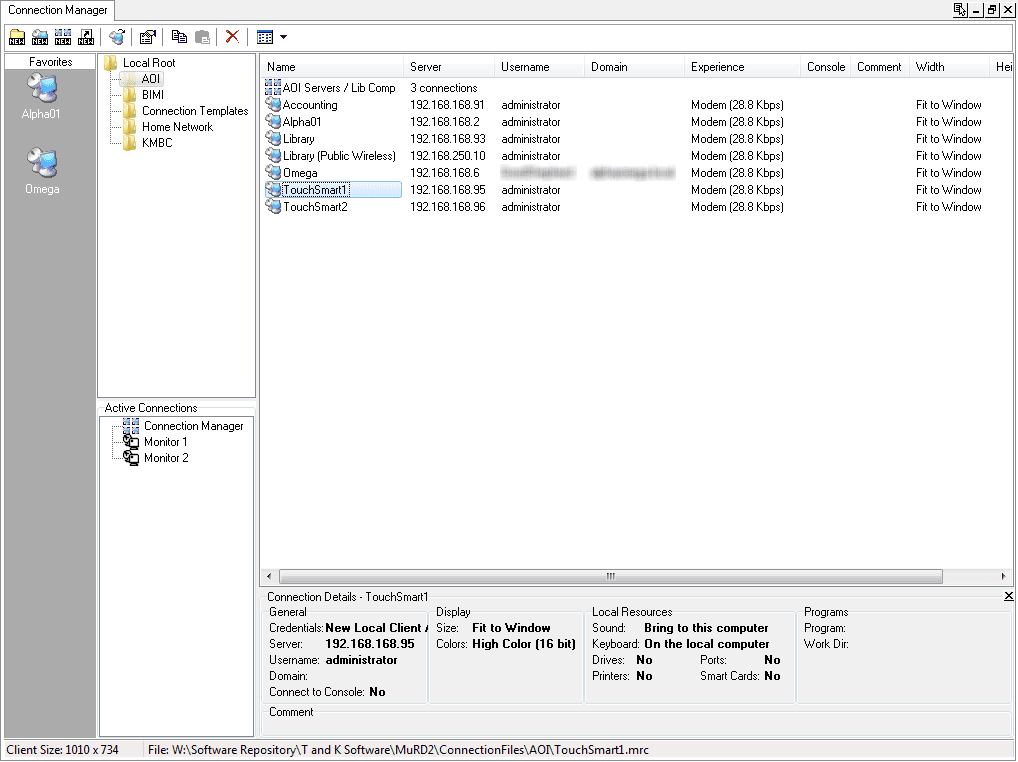
The Connection Manager is the heart of MuRD’s management capabilities. It is a tab within the MuRD interface that is opened by default when the application launches. Within Connection Manager you can add new connections, create a folder hierarchy for your connections, drag connections to a favorites panel for easy access and even see which connections are open on which monitor. Also within the Connection Manager tab is an optional Connection Details pane that allows you to quickly see some of the specific options that have been chosen for a selected remote desktop connection.
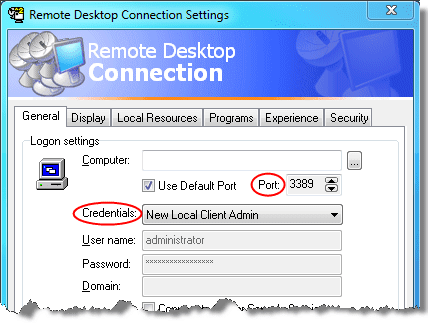
Making a remote desktop connections is virtually the same as using the familiar Windows Remote Desktop Connection application (mstsc.exe). However, there are a few useful additions. For example, you can change the port that the RDP client attempts to connect to and you can populate the username, password and domain fields using credential sets that you pre-make.
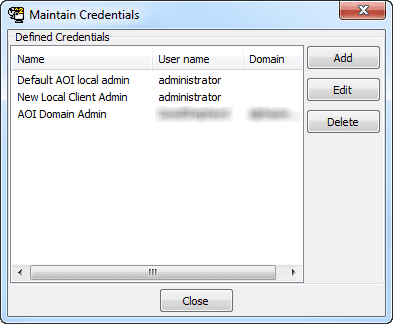
Saving sets of credentials that you use frequently is done via the “Shared Credentials” feature. Once created, shared credentials are then available to be applied to any new or existing remote desktop connection in MuRD’s Connection Manager. Shared credentials are also very handy for when you change important passwords on your servers but have dozens of saved RDP connections with pre-populated credentials (you do change passwords frequently, don’t you?). Simply change the password once in the Defined Credentials list and all saved connections that use that credential set are updated.
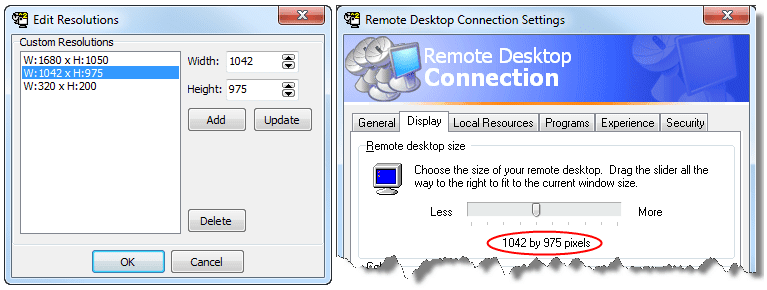
You can also save custom resolutions within MuRD that are then offered as a choice within a connection’s display tab. The resolution size can be any height and width giving you the ability to make whatever unusual resolution you may need.
If you already have a library of .rdp files, you can easily import them into MuRD. Once you’ve created and imported multiple connections, organizing them is as simple as creating folders and dragging-and-dropping them to their proper places all within Connection Manager. You can create connection shortcuts within MuRD to place a single connection in more than one location for logical grouping reasons.
The ability to copy and paste connection files within MuRD allows you to quickly create multiple connections to similar computers. You could also create new connections without any computer specific information as a type of template file. Then it’s as simple as a copy and paste operation to have a new connection that has pre-populated connection options which will only need minor tweaks to be ready for use (for instance, customizing the IP address and connection name).
For easier viewing, the connections shown within MuRD can be listed using familiar Windows display options such as small icons, large icons, detail view or list view.
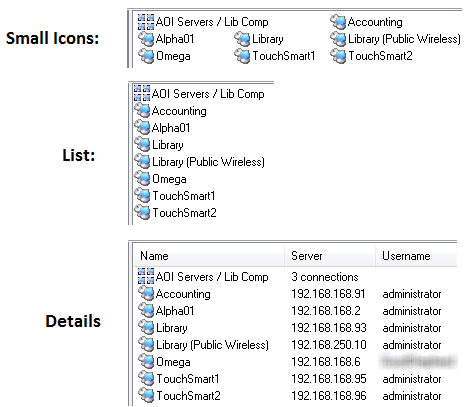
If you have a set of RDP connections that you seem to launch all at one time you can create a group and then add individual connection files to that group. When you open it, all connections associated with that group will simultaneously open.
You can easily share your connection files with other MuRD users using a mapped drive or UNC path. This can be quite handy for a group of admins who require access to the same servers. There are two ways to share connections: with “Group Connections” or “Shared Connections”. The difference between the two is simple. Group connections cause the connection files to be read only and Shared Connections allow you to edit the saved RDP connections.
With all of these connections available, if you have more than just two or three open simultaneously you’ll probably want to know exactly which sessions are currently active and where each session’s window is located. The “Active Connections” pane within connection manager gives you at-a-glance visibility into which monitor or tab a connection’s screen is on. This is especially handy for those who have multiple monitors. Double clicking the connection within the Active Connections pane will bring you immediately to that connection window.
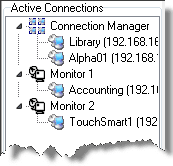
But how do you choose which connections are opened on a specific monitor or in a tab? By simply right clicking on a connection within Connection Manager and choosing where you want it to be opened. If a session is already open in a tab you can move it to a full screen window by right clicking on the tab and choosing which monitor you would like it to be expanded to. If a connection is already open in a full screen window, just click the “move to a different monitor” button on the remote desktop connection bar and choose where you want to move it to. Finally, you can use the “Active Connections” pane to select an open connection and drag-and-drop it to the desired monitor or to a tab in Connection Manager.

“But wait!” you might be saying, “That doesn’t look like the Remote Desktop bar that I know!” Very true. When a remote desktop session is open in full screen mode, the familiar remote desktop bar is there, but with some unfamiliar icons added. These icons, in order from left to right, include the familiar pin, the option to use SmartSize window scaling, a button that will bring the connection manager tab to the foreground, a button that allows you to switch to any other active session and a button that will give you the option to move the active connection to another monitor or back into a tab within connection manager.
There are other small, but thoughtful features scattered throughout MuRD. For instance, you can set a master password on the application that is required before it will launch. Also, right clicking a connection within the connection manager offers a “connect to console” option. This allows you to create a non console connection file while giving you an easy ability to connect to a console session if necessary. Gone are the days of manually editing the console option in each saved .rdp connection or even having duplicate .rdp connection files for each server with one being for the console session.
One of the best features of MuRD is that it is portable! MuRD comes in an .exe package or in a simple .zip file. The specific instructions to make the contents of the .zip package portable are on the developer’s web site. It’s as simple as creating two specific folders within the MuRD application directory. After that, MuRD is portable and you can take your settings and connection files with you wherever you go! There are no registry edits or any other modifications made to the local computer.
One conceivable disappointment for some may be the program’s inability to connect to different protocols such as VNC, Citrix or SSH. However, MuRD by its very name is focused solely on Microsoft Remote Desktop connections and if that’s what you find yourself connecting to most often, then MuRD may be the program for you.
There is a cheater’s way of including other connection and file types in the MuRD connection manager. Since the connection files and folders are simply stored in MuRD’s application folder (or a file share if you use group/shared connections), you can drop any file within the folder structure and then check the “Show other File Types” option within MuRD’s Settings menu. Now you can place shortcuts, batch files and anything else in the MuRD “ConnectionFiles” folder hierarchy and see them within MuRD’s connection manager.
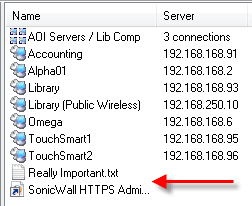
MuRD itself will not open the files of course. Think of this as using MuRD as a stripped down version of Windows Explorer that can only browse within MuRD’s ConnectionFiles folder.
Best of all, it runs on Windows 7 without administrator privileges or any compatibility mode. The one exception is the “ping” command. If you right click a connection, you will see the option to ping that host. The ping operation will fail to run properly if MuRD is not run as an administrator. Admittedly, the ping feature is probably MuRD’s least commonly used feature.
I have encountered some minor bugs while using the application. One involved occasionally not being able to move active full-screen sessions between screens or the Connection Manager. Happily, T and K Software’s responses to my requests for support in hunting down those potential bugs and also answering my requests for general help were quick, thorough and courteous. That’s quite a bonus these days. The software is in active development and continues to improve. In the end, the application delivers what it advertises. If you deal with many RDP connections in the course of a day, $34.95 USD could help you on your way to a more efficient workday.
Try the free 30-day evaluation of MuRD to see if it helps you be more efficient!