



SQL Server Essentials: Using SQL COALESCE
- Blog
- SQL Server
- Post

When working with SQL Server databases, the SQL COALESCE expression is commonly used to detect null values and provide a fallback or default value when dealing with nullable columns or expressions in SQL queries. It’s like a syntactic shortcut for the CASE expression, and it’s typically used to make subsequent calculations easier. In this article, I’ll detail how the SQL COALESCE expression works and how it can be used in your applications.
SQL COALESCE and NULL values
SQL SELECT queries allow you to retrieve, manipulate and transform data. However, one of the problems that you may run into is that not all columns in your database have data. It’s essential to understand how to work with missing values in query results. Missing values can impact calculations, the display of data on reports, and other data accrual and transformation operations. You need to understand how you can avoid allowing null values to negatively impact your query and reporting results.
In Structured Query Language (SQL), Null (or NULL) is a unique marker that informs you that a data attribute does not exist in the database. In other words, Null is used to indicate that there is no data in a particular column or result.
Fortunately, SQL Server contains a number of specialized expressions that are designed to make your job of manipulating and processing data easier. In the T-SQL language, the COALESCE expression and the ISNULL function are used to deal with Null values.
COALESCE vs. ISNULL
The ISNULL function and the COALESCE expression have similar purposes, but they behave differently. COALESCE is ANSI SQL standard compliant, meaning it is supported by most database systems. On the other hand, ISNULL is a T-SQL specific function and may not be available in other database systems.
The ISNULL function only takes only 2 parameters. It can be used to test if a value is Null, and in that case, it can optionally replace the Null value with another value that you provide. Because ISNULL is a function, it is only evaluated only once.
The SQL COALESCE expression is also used to process Null values that your queries retrieve from the database. COALESCE accepts a variable number of parameters which allows for more flexibility in handling multiple fallback values. COALESCE is also an expression that can be evaluated multiple times.
The data type determination of the two operators is also different: ISNULL uses the data type of the first parameter while COALESCE follows CASE expression rules and returns the data type of the value with the highest precedence.
SQL COALESCE syntax
The SQL COALESCE expression is available in both on-premise SQL Server as well as Azure SQL Database, Azure SQL Data Warehouse, and Parallel Data Warehouse. The SQL COALESCE expression has a simple syntax, and it is used to return the first non-null value from a list of data values. COALESCE evaluates the arguments in the specified order and always returns the first non-null value from the argument list.
You can see the basic COALESCE syntax in the following example:
COALESCE ( expression [1..n] )
Using SQL COALESCE with the AdventureWorks sample database
The SQL COALESCE expression will return the data type with the highest data type precedence. If all arguments are NULL, then COALESCE will return NULL. In other words, Null is a condition for the SQL COALESCE function.
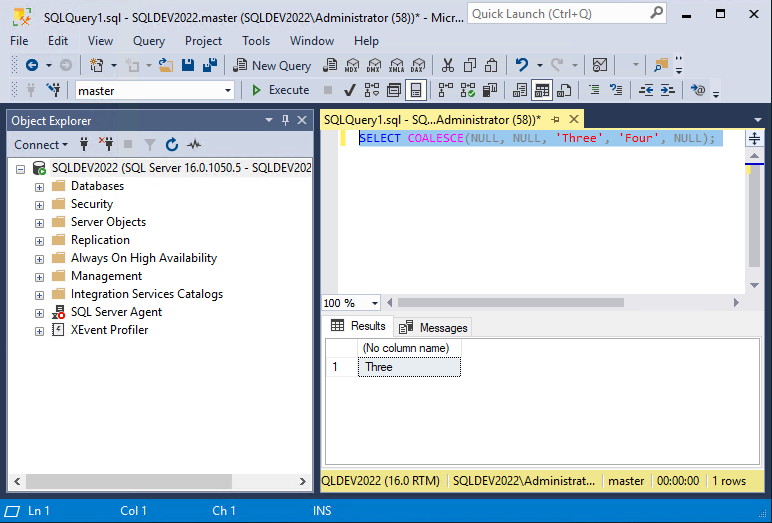
You can see an example of how the COALESCE expression works in the following SQL statement.
SELECT COALESCE(NULL, NULL, 'Three', 'Four', NULL);
In this example, the COALESCE expression evaluates five input values that use commas as a delimiter. In this sample dataset, the first two are NULLS and the last two are string values. Here, the return value is the third item in the argument list because the third value is the first argument in the list of data values that isn’t Null.
You can see the results of this example statement in the following figure.
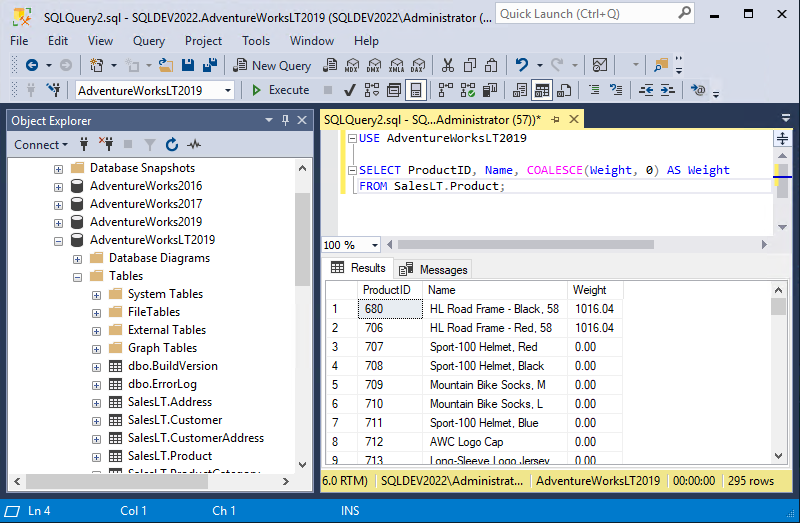
Now that we have a basic understanding of how the syntax for the SQL COALESCE function, let’s take a look at how COALESCE can be used in your applications with a couple of examples from the AdventureWorksLT2019 sample database. In the following example, we’re selecting the ‘ProductID’, ‘Name’, and ‘Weight’ columns from the SalesLT.Product table. The COALESCE function is used to replace any null values in the ‘Weight’ column with 0, and this can be useful for data validation.
USE AdventureWorksLT2019;
SELECT ProductID, Name, COALESCE(Weight, 0) AS Weight FROM SalesLT.Product;
If a product has a non-null weight value, that value will be returned. If a product has a Null weight value, then it will be replaced with 0 in the result set. This ensures that there is always a valid numeric weight value for each product.
You can see the results of this SQL COALESCE example in the following figure:
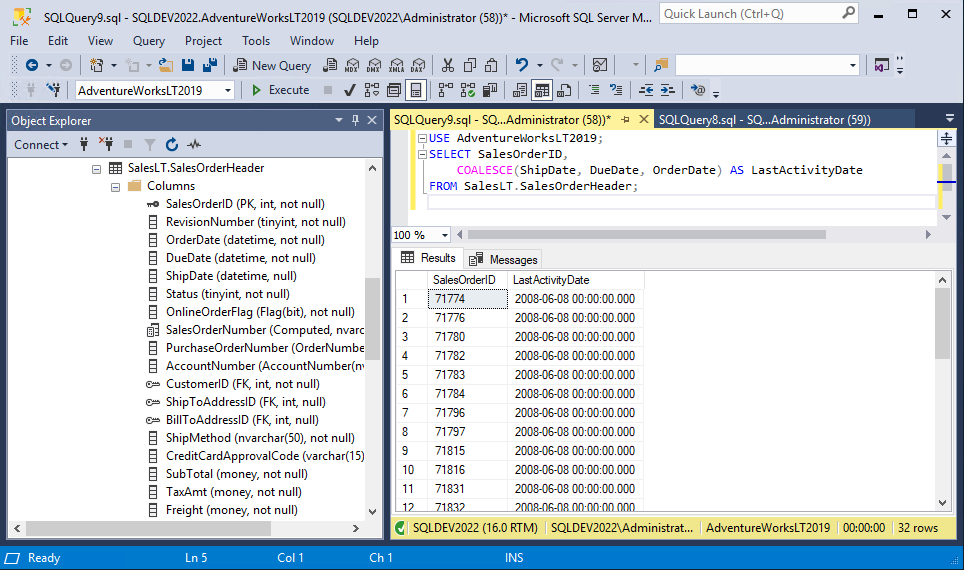
Next, let’s see an example of how the SQL COALESCE expression can be used to pick the most recent activity date for an order using the AdventureWorksLT2019 database. In the following example, the SQL COALESCE function is used to return the first non-null value from the ‘ShipDate’, ‘DueDate’, and ‘OrderDate’ columns. This ensures the most recent activity date will be shown for each order.
USE AdventureWorksLT2019;
SELECT SalesOrderID,
                COALESCE(ShipDate, DueDate, OrderDate) AS LastActivityDate
FROM SalesLT.SalesOrderHeader;
If ‘ShipDate’ is not null, then it will be displayed. However, If ‘ShipDate’ is null but ‘DueDate’ isn’t, then ‘DueDate’ will be displayed. Lastly, if both ‘ShipDate’ and ‘DueDate’ are null, then ‘OrderDate’ will be displayed as the delivery date.
You can see the results of this command in the following figure:
Using SQL COALESCE can enhance data presentation
In this tutorial, you learned about how the SQL COALESCE expression can help you to process Null values that are returned by your queries. SQL COALESCE can be used to find the first Null value in the result set. Beyond this, it can also be used to find and replace Null values with other more user-friendly values.
Using the SQL COALESCE expression can help you to ensure that your applications can provide fallback values or default values with meaningful data, thereby enhancing the data presentation and handling of your SQL queries. COALESCE is a standard SQL feature, and it is also available in other RDBMS systems including Oracle, MySQL, and PostgreSQL.